If you've just discovered the funky friday roblox game and want to know whether it's worth your time, the short answer is yes — it's one of the most accessible rhythm battlers on the platform, and a solid funky friday beginner guide can get you into your first match in under five minutes. Built by Lyte Interactive, the title borrows the back-and-forth "press the arrows" energy from Friday Night Funkin' but turns it into a real-time multiplayer duel where timing wins matches. This walkthrough covers the funky friday how to play basics, the control scheme, the modes you'll actually queue into, and the early funky friday tips and tricks that separate consistent winners from frustrated newcomers. By the end you'll know exactly how to start, what to expect, and where to focus if you want to climb.
What the Funky Friday Roblox Game Actually Is
Funky Friday is a rhythm action game hosted on Roblox, developed and maintained by Lyte Interactive. According to the official Funky Friday game page, the experience sits under the Action genre with the Music & Rhythm subgenre, which places it alongside other arrow-based battlers on the platform. The Roblox Wiki entry on Lyte Interactive and Funky Friday confirms that the game plays similarly to the browser hit Friday Night Funkin', but the big difference is that you face other real players in head-to-head matches rather than solo charts against the CPU.
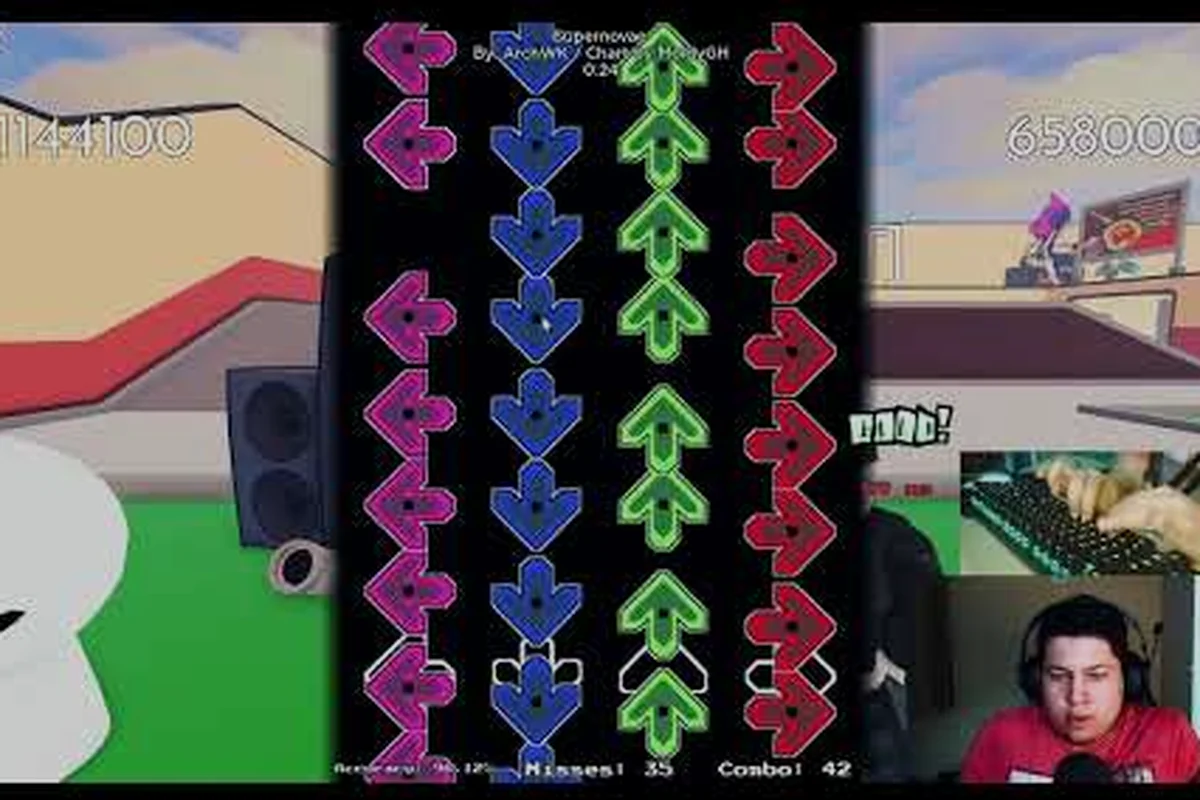
The community-maintained Funky Friday wiki describes the title as a massively multiplayer rhythm experience where arrows scroll toward receptor zones, and you press the matching arrow key (or WASD) the instant they line up. Every note you hit cleanly triggers a pose from your selected animation, and missing too many notes means your opponent out-scores you. The studio treats regular server shutdowns as update signals, so charts and song lists rotate between patches.
Core Game Loop at a Glance
-
Matchmaking: Drop into a server, pick a song, and face another player trading arrow presses in real time.
-
Scoring: Each clean note adds to your score; misses subtract or break your combo.
-
Animation Layer: Your selected character plays a pose on every clean hit, giving matches a personality of their own.
-
Progression: Earn points from matches to unlock new songs, animations, and arrow skins from the in-game shop.
-
Solo Mode: A practice option exists for players who want to chart a song before queuing into multiplayer.
Why the Game Stays Popular
The game's appeal comes from how forgiving the early difficulty curve is. Beginners can queue into Easy charts and pick up the timing within a few songs, while experienced players chase the toughest tracks in the roster. A long-running Reddit thread asking players why they prefer Funky Friday over competing FNF-style Roblox experiences highlights two repeated themes: the charting feels fair, and the multiplayer loop keeps you coming back because you're always playing against a real person, not a pattern.
Controls, Keybinds, and the Arrow System
Every Funky Friday match revolves around a four-direction receptor at the bottom of the screen. Arrows scroll upward from below, and you press the matching key the moment an arrow snaps onto the receptor. The default keybinds use the four arrow keys, but the game also supports WASD as a full replacement layout. The official page notes that Keybinds and arrow skins are now located under settings, which means you no longer hunt through menus to remap controls.
Default Input Layout
| Input | Direction | Notes |
|---|---|---|
| Arrow Up / W | Up arrow | Most common in chart intros |
| Arrow Down / S | Down arrow | Frequent in basslines |
| Arrow Left / A | Left arrow | Common during call-and-response sections |
| Arrow Right / D | Right arrow | Used in roll patterns |
| D-Pad (console) | All four | Console fallback layout |
| XYBA (console) | All four | Alternate controller layout |
The console support is worth noting if you play Roblox on Xbox. The D-PAD and XYBA layouts let you map to the face buttons on a standard controller, which matters because some of the denser charts are uncomfortable to play with a thumbstick.
Note Speed Fundamentals
Two settings control how arrows approach the receptor: note speed and scroll direction. Note speed changes how far in advance an arrow appears before it must be hit, so cranking it up means less reaction time but tighter visual rhythm. Scroll direction can be flipped if you prefer arrows coming down from the top instead of rising from the bottom.
| Setting | Default | Beginner-Friendly Value | Advanced Value |
|---|---|---|---|
| Note Speed | 15 | 10–12 | 18–22 |
| Scroll Direction | Up | Up | Up or Down (player preference) |
| Receptors | Centered | Centered | Custom skin |
| Arrow Skins | Default | High-contrast (for visibility) | Cosmetic preference |
Community testing reported on the r/funkyfridayroblox tips thread shows that dropping note speed to 10–12 for the first week helps new players build pattern recognition before pushing it back up. Cranking speed too high on day one is a common reason beginners think the chart is "too fast" when really they just need a slower visual reference.
Game Modes and What to Queue Into
Funky Friday offers a small handful of modes, and choosing the right one for your skill level is half the battle. The multiplayer duel is the main attraction, but solo play and event modes each serve a clear purpose. A practical the subreddit's beginner tips thread for new players usually starts with the easier difficulty charts and works upward.
Multiplayer Duel
The default queue. You and another player are dropped into the same song, and whoever scores higher when the chart ends wins. Easy, Medium, and Hard chart pools exist for most tracks, with a smaller Expert pool reserved for the hardest songs. The community report from the Reddit tips thread notes that drilling problem sections on Easy before attempting the same chart on Expert is how most long-term players build the muscle memory for high-density patterns.
Solo Mode
Solo lets you play a chart without an opponent, which makes it the best place to learn a new song. The score still tracks, and the animation still plays, so you get the full visual feedback without the pressure of a live match. Solo is also where you should test changes to your note speed or keybinds, because the consequences of a bad setting show up clearly in your accuracy.
Event and Limited Modes
Lyte Interactive rotates event modes during holidays and major updates. These often feature modifier rules such as faster note speed, restricted keybinds, or doubled scoring on certain patterns. They're a good source of bonus points if you're already comfortable with the base chart pool, but you can safely skip them during your first week.
Mode Selection Snapshot
| Mode | Best For | Pressure Level | Recommended First Session |
|---|---|---|---|
| Multiplayer Duel | Testing yourself against real players | High | After 3–5 solo runs |
| Solo | Learning charts and adjusting settings | Low | First session |
| Event / Limited | Bonus points and variety | Variable | After week 1 |
Funky Friday Tips and Tricks to Get Better Fast
Improving at Funky Friday isn't about grinding hours — it's about stacking small habits. The following tips come from a combination of the community tips thread, the Funky Friday reference wiki, and patterns that show up repeatedly in player discussions. If you want a structured path for funky friday how to get better, treat this as your week-one checklist.
Practice Slow, Then Push Speed
The single most repeated tip in the community thread is to slow the note speed until the pattern reads cleanly, then increase it gradually. Players report that adjusting note speed until patterns read clearly is the fastest way to clean up a tough chart. The reference wiki reinforces this: arrows scroll toward receptor zones, and the visual gap between notes is what your brain actually reads, not the audio tempo.
Drill Problem Sections, Not Whole Songs
A full song might be 90% easy and 10% brutal. The trick is to identify the brutal 10% — usually a roll pattern, a quick back-to-back, or a sudden key change — and loop that section in Solo until you can clear it three times in a row. Only then does the rest of the song start to feel comfortable. This is a core funky friday how to play habit that beginners often skip because full runs feel more rewarding.
Use a Consistent Hand Position
Place your index, middle, ring, and pinky fingers on the four arrow keys (or WASD equivalents) and don't lift your hand. The reason: reaction time on a four-finger home position is roughly 30–50 ms faster than reaching for keys, and that gap decides close matches. The community wiki explicitly supports the four-key home row approach, and console players benefit from the same principle using face buttons.
Watch Your Opponent's Health Bar
In multiplayer, the score readout alone doesn't tell you whether you're winning. Watch the round's progress bar at the top or side of the screen (it varies by skin) to know when to push a combo versus when to play safe. A 10-note streak at the right moment often decides a round more than a 50-note streak spread across the whole song.
Spend Points on Consistency, Not Cosmetics First
Beginners often blow their first points on a flashy animation. The smarter move is to spend on a high-contrast arrow skin so notes are easier to see at high speed. Once your accuracy is stable, you can return to cosmetics. The dedicated shop and points guide breaks down which early purchases give the most value for new players.
Match Length and Stamina
Funky Friday rounds are short by design — most charts run 1:30 to 2:30. This matters because it means you can play ten matches in a session without fatigue setting in, and you can use the between-match lobby to stretch your hands. Don't queue into back-to-back Expert charts; the community-reported failure mode is finger cramp after hour two.
Building a Practice Routine for Steady Improvement
If you've read the tips and you're still bouncing between wins and losses, the missing piece is usually structure. Below is a simple routine that has been echoed across the r/funkyfridayroblox thread and the reference wiki, broken into three daily time blocks. For a deeper breakdown of practice methods, the solo practice guide expands on the loop-and-drill approach in more detail.
Suggested Week-One Schedule
| Block | Duration | Activity | Goal |
|---|---|---|---|
| Warm-up | 5–10 min | Solo, Easy chart, slow note speed | Loosen fingers, confirm settings |
| Drill | 10–15 min | Solo on one problem chart, loop the hard section | Build accuracy on the toughest pattern |
| Live Match | 10–15 min | Multiplayer Duel, Easy or Medium | Apply accuracy under pressure |
Total time: about 30 minutes per session, three sessions across the week. Players who follow a similar structure report that they clear their first Hard chart within two weeks and start scoring on Expert within a month. The exact timeline varies by song choice, but the structure itself is the constant.
Tracking Progress Without Obsessing Over Numbers
Funky Friday's accuracy readout is useful, but it's noisy on short songs. A better signal is whether you can clear the same chart three times in a row with no major drops. If you can, you're ready to move up a difficulty. If you can't, you need another drill session, not another full song. The community wiki's reference page treats chart mastery in three tiers: pass, clear, and full combo, which mirrors how most rhythm games track progression.
When to Change Settings
Players sometimes blame themselves when the real fix is a settings change. The two most common adjustments are:
-
Note speed too high: You keep missing the first arrow of every section. Drop speed by 2 and retry.
-
Receptor visual too small: You lose track of where arrows land. Switch to a larger receptor skin via settings.
A broader overview of how arrows work, including the different receptor skins and visual options, is covered in the Funky Friday 2026 arrow and modes guide, which pairs well with the practice routine above.
Beginner Traps That Cost You Matches
Even with a good routine, a few patterns show up again and again in new players. The first-time playing walkthrough at funky friday first time playing goes deeper into the early-session experience, but the most common pitfalls are worth listing here.
Mistake 1: Queueing Expert on Day One
Expert charts often have pattern density that requires weeks of muscle memory. Queuing in on day one doesn't speed up learning — it builds bad habits because you're missing so many notes that you can't read your own timing errors. Stay on Easy or Medium for at least the first week.
Mistake 2: Ignoring the Animation Layer
The animation isn't just decoration. It confirms whether the game registered your hit. If you press a key and your character doesn't play the corresponding pose, you missed the note. Beginners often think they hit a note when they were actually late, and the animation is the cleanest visual feedback the game gives you.
Mistake 3: Playing Without Stretching
Rhythm games cause repetitive strain faster than most genres because the input is constant. Five minutes of finger stretches before and after a session is a small habit that prevents bigger problems later. Players on the Reddit tips thread report that the biggest leap in consistency often comes from recovery, not raw practice time.
Mistake 4: Switching Songs Every Match
Rotation feels productive, but it spreads your practice thin. Pick three to five songs and stick with them until you can clear each on the difficulty just below your target. Then move up. For a structured approach to improving your accuracy once you have the basics, the full combo and accuracy guide walks through how to push your hit rate upward without burning out.
Frequently Asked Questions
Is the funky friday roblox game free to play?
Yes. Funky Friday is free to join on Roblox. The game monetizes through optional cosmetic purchases and point-based unlocks, but the full multiplayer and solo experience is available without spending Robux. You only need a standard Roblox account to start.
What devices can I play Funky Friday on?
You can play on PC, mobile, and Xbox through the standard Roblox client. The community wiki confirms that console players get D-PAD or XYBA controller layouts as fallbacks. The PC experience is the most competitive because keyboard input is the fastest control scheme.
How do I improve my accuracy in Funky Friday?
The most consistent approach is to slow your note speed to 10–12, drill problem sections in Solo mode, and only queue into multiplayer once you can clear a chart three times in a row. Players who follow this loop report a noticeable accuracy jump within a week.
Can I play Funky Friday with friends?
Yes. The multiplayer mode matches you with another player for each round, and you can party up with friends through Roblox's standard group features. Some servers lean more competitive than others, so the social side depends on who you queue with.
What is the best way to spend starting points?
Spend on a high-contrast arrow skin and a single Easy or Medium song unlock so you have a small, focused chart pool to grind. Save cosmetic animations and premium skins until your accuracy is stable. The shop and points guide linked earlier breaks this down in more detail.